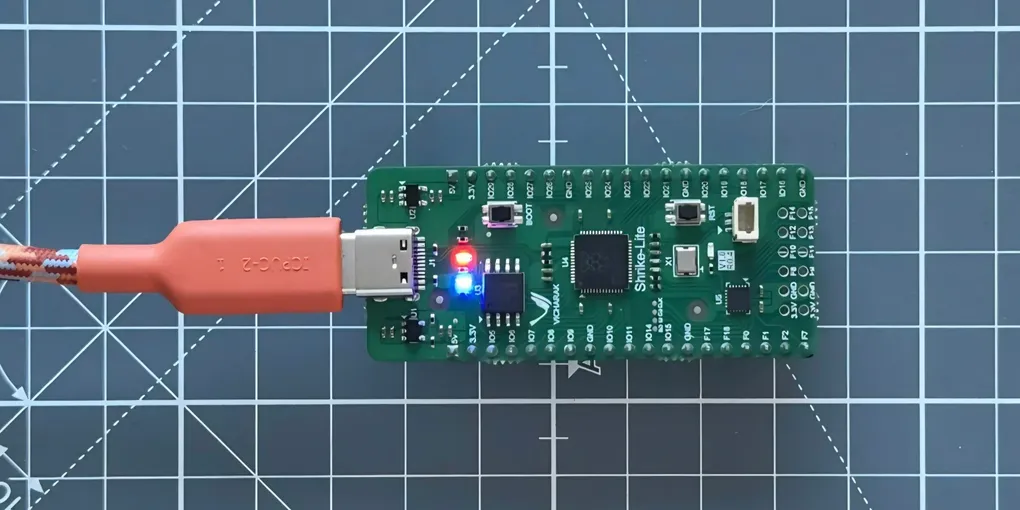
Review: Vicharak Shrike Lite
My honest opinion of the low-cost dual-hybrid MCU and FPGA board
As one of my latest projects I built SENTINEL // 01, a radar-style sensing system using an ultrasonic sensor mounted on a rotating motor. To build it, I used the Vicharak Shrike Lite, a low-cost development board that combines an RP2040 microcontroller with a Renesas ForgeFPGA.
What interested me about the Shrike Lite wasn’t simply having another microcontroller to build with, but the combination of programmable logic and conventional firmware on the same board. I’d worked with microcontrollers and embedded systems before, but this gave me the opportunity to explore how an FPGA could complement an MCU within a real project.
Vicharak provided the Shrike Lite for this project. This review reflects my experience using the board to build SENTINEL // 01.
Building with the Shrike Lite
SENTINEL uses an HC-SR04 ultrasonic sensor mounted to a motor so that it can sweep through an area and measure the distance to objects around it. The measurements are then sent over serial to a Python program, which handles the visualisation.
I used the ForgeFPGA for the lower-level motor and ultrasonic sensor control, while the RP2040 handled the higher-level logic and interface. The overall flow was:
HC-SR04 + Motor → ForgeFPGA → RP2040 → Serial → Python
This division of responsibilities was the most interesting part of using the board. Rather than putting all of the hardware control into the RP2040 firmware, I could move the timing-sensitive, lower-level work into the FPGA and keep the MCU focused on the rest of the application.
I didn’t benchmark SENTINEL against an equivalent RP2040-only implementation, so I can’t put a figure on any performance improvement from using the FPGA. What I did notice in practice was that the MCU side of the project became considerably simpler. The benefit was therefore more architectural than something I could quantify with a benchmark.
It also changed how I approached the design. Instead of asking how to make the MCU handle everything, I could decide which parts of the system made most sense in software and which were better suited to programmable hardware.
Getting started
The FPGA side of the Shrike Lite does introduce more to learn than you would have with a conventional MCU development board. You’ll need to install the Go Configure Software Hub for the ForgeFPGA development workflow, and you’ll be working with Verilog alongside the usual MCU development.
That can initially sound fairly daunting, particularly if FPGA development isn’t something you’ve worked with before. In practice, though, I found the transition much easier than I expected.
The Vicharak tutorials were genuinely useful, particularly when getting specific hardware working, and the examples around the ultrasonic sensor gave me a solid starting point for SENTINEL. Rather than having to work out the entire FPGA implementation from scratch, I could use the examples to understand the intended workflow and build from there.
Once I had the development environment set up, I found the Verilog side fairly straightforward for what I needed to implement. The FPGA was new territory for this particular type of project, but the underlying concepts made sense fairly quickly once I could see how they fitted into the wider system.
I was able to get the FPGA and RP2040 working together within a few hours, which I think is a good indication of how accessible the platform can be. There’s certainly a learning curve, but I didn’t find it particularly difficult to get from the initial setup to a working system.
The flashing process
The one part of the setup that I found less intuitive was the flashing process. With both an FPGA and RP2040 involved, there are a few different stages to understand, and initially it wasn’t completely obvious how each part fitted together.
Once I understood the workflow, it wasn’t particularly difficult, but it did take some figuring out the first time around. This is probably the area I’d most like to see made clearer for someone coming to the board for the first time.
At the same time, you’re setting up a system that combines an FPGA and an MCU, so there is inevitably going to be more involved than flashing a conventional microcontroller board. Considering the architecture, I was actually impressed by how straightforward the overall process was once I understood it.
FPGA + RP2040 in practice
The biggest thing I liked about the Shrike Lite is that the FPGA and RP2040 genuinely complement each other.
It’s one thing to see a hybrid architecture described in a specification, but building a real system around it makes the concept much more tangible. With SENTINEL, I found that dividing the work between the two made the overall firmware easier to manage and gave the project a clear separation between low-level hardware control and the application logic.
I also like that the FPGA doesn’t have to replace the MCU. The two are useful for different types of work, and having both available means you can decide where that boundary makes sense for a particular project.
For SENTINEL, that approach worked well. The FPGA gave me a practical way to move some of the lower-level control out of the main application, while the RP2040 remained a familiar environment for the higher-level software.
Hardware and development experience
Physically, the Shrike Lite is fairly straightforward to work with. The GPIO layout worked well for SENTINEL, and I didn’t encounter any issues with the board’s reliability during testing. Considering that the board has to accommodate both an FPGA and an RP2040, I think the overall layout is sensible and doesn’t make the board awkward to work with.
The more interesting part is obviously the development experience. Once the initial setup is out of the way, the workflow feels reasonably familiar, particularly if you’re already comfortable with embedded development. You’re essentially adding programmable logic to the usual MCU workflow rather than having to completely rethink how you build an embedded system.
The main difference is that you now have another option available when deciding how to implement something. You can choose whether a particular task belongs in the MCU firmware or whether it makes more sense to implement it directly in the FPGA. For the right project, that’s a useful distinction to have.
Do you actually need an FPGA?
Probably not for most projects, and I think that’s important to acknowledge.
A conventional microcontroller can already handle a huge range of embedded applications. If you’re reading sensors, controlling motors, communicating with peripherals or building a relatively straightforward embedded system, adding an FPGA may introduce complexity without providing much practical benefit.
The Shrike Lite becomes interesting when the FPGA is actually part of the design.
If you’re interested in learning FPGA development, experimenting with programmable logic or building systems where hardware and firmware have different responsibilities, having the ForgeFPGA and RP2040 together gives you a useful platform to work from.
That’s what worked well for SENTINEL. The project could have been implemented entirely around an MCU, but using the FPGA gave me a practical reason to explore that side of embedded development and made the division of responsibilities within the project much clearer.
It also means the Shrike Lite doesn’t have to be viewed as a board for every embedded project. Its value is more specific: it’s a platform for experimenting with programmable hardware alongside a conventional MCU without having to assemble the two sides separately.
Who is it for?
I’d primarily look at the Shrike Lite if you’re interested in FPGA development, low-level embedded systems or hybrid hardware and software architectures.
If the goal is simply to get a sensor reading or motor moving as quickly as possible, there are simpler MCU development boards that make more sense. The Shrike Lite’s appeal comes from having the FPGA available when you actually want to use it.
I also think it’s a particularly useful platform for someone who already has some embedded development experience and wants to start working more closely with programmable hardware. You don’t need to be an FPGA expert to get started, and the Vicharak tutorials and examples provide a useful entry point, but there is enough depth there to go well beyond a basic example project.
For me, that was one of the strongest aspects of the board. I could approach it from the MCU side I was already comfortable with while gradually bringing the FPGA into the project where it made sense.
Final thoughts
I went into SENTINEL expecting the FPGA side of the project to be the part that would take the most time. There was a new development environment to set up, Verilog to work with and a flashing process I hadn’t used before, so it would have been easy for that side of the project to become a significant barrier.
In reality, I was able to get the board working as part of a complete project within a few hours. The Vicharak tutorials and examples made a noticeable difference, particularly for the ultrasonic sensor, and once I understood the development and flashing workflow, the process was fairly straightforward.
The biggest thing I took away from the Shrike Lite wasn’t a specific performance improvement, since I didn’t benchmark it against an equivalent MCU-only implementation. Instead, it was seeing how useful the combination can be when each side is used for what it does well. For SENTINEL, that made the MCU firmware simpler and gave the project a cleaner overall architecture.
The Shrike Lite isn’t necessary for every embedded project, and in most cases you probably don’t need an FPGA at all. What it does provide is a relatively accessible way to experiment with FPGA and MCU development on the same board. For anyone interested in FPGA development, lower-level embedded work or exploring how programmable hardware can complement conventional firmware, it’s an interesting platform to work with.