InferPerf
Exploring AI inference performance on Arm with Linux perf and hardware performance counters.
AI inference performance is about more than how long a model takes to run. Instruction throughput, memory access patterns, branch behaviour and runtime overhead can all affect how efficiently a workload executes. The challenge is figuring out which factors matter for a particular workload, and what to investigate next.
I built InferPerf to make that process easier. It combines Linux perf, hardware performance monitoring unit (PMU) counters and flamegraphs to look beyond a single runtime figure and explore how an AI workload behaves on Arm hardware. The aim is to bring performance measurements into one workflow, from an initial profile through to validating and comparing changes.
InferPerf uses three stages: Analyse, Validate and Compare. I developed the workflow around example vision and transformer workloads, including MobileNetV2 and MiniLM-L12, while keeping it adaptable to other inference workloads.
Why look beyond inference time?
Runtime tells you what happened, but not always why. Two implementations can take different amounts of time because they execute different amounts of work, access memory differently, spend time in runtime setup or behave differently at the processor level.
I wanted to connect those observations. Model-level profiling can show which operations take the most time; hardware performance counters provide another view, with signals such as cycles, instructions, cache activity, branch misses and TLB behaviour. InferPerf brings these measurements together with execution profiles to help guide the next experiment.
It is designed to complement model and runtime profilers, rather than replace them. Hardware counters can point towards something worth investigating, but they do not prove a bottleneck on their own. The useful part is combining the measurements with a hypothesis, making a targeted change and testing it again.
What you’ll need
The Arm-based development board used for the project. InferPerf needs a compatible Linux environment and access to the performance events supported by the target processor.
View →Collects execution profiles and hardware performance counter data. Available events and permissions depend on the processor, kernel and system configuration.
Documentation →Turns profiling data into flamegraphs, making it easier to explore where sampled execution time is concentrated.
View →InferPerf also uses Python and ONNX Runtime for its example workloads. The setup instructions and dependencies are available alongside the source code.
Get started
Clone the project, create a virtual environment and install the Python dependencies:
git clone https://github.com/el22mf/inferperf-src.git
cd inferperf-src
python3 -m venv .venv
source .venv/bin/activate
pip install -r requirements.txt
A good place to start is the included MobileNetV2 workload:
inferperf analyse mobilenetv2 --warmup 3The --warmup option lets the workload run before measurements are collected, helping reduce the influence of initialisation and cold-start effects. You can also run inferperf analyse or inferperf compare without arguments to use the guided interactive menu.
The example environment used Python 3.11.2, ONNX Runtime 1.18.0 with CPUExecutionProvider, Raspberry Pi OS (64-bit, 3 May 2024 image), Linux kernel 6.6.20-v8+ and perf 6.6.20. Performance events and permissions can differ between systems, so check what is available on your target before running an experiment.
How InferPerf works
InferPerf links workload execution, performance-data collection, interpretation and visualisation through a three-stage workflow.
1. Analyse
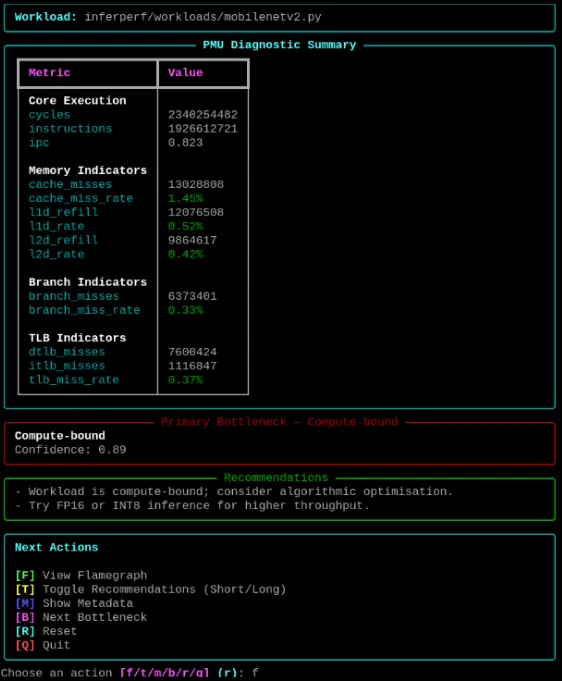
The Analyse stage profiles a workload with perf, collects the configured PMU metrics and generates a flamegraph. InferPerf then applies explicit rules to the measurements to classify potential bottlenecks and suggest areas to investigate.
For example, branch-miss activity may prompt a closer look at control flow. Cache-refill activity can motivate an investigation into memory locality and working-set size, while TLB misses can indicate that address-translation behaviour is worth examining. These are clues rather than automatic diagnoses: the interpretation depends on the workload and should be checked against the rest of the profile.
Each analysis also stores a baseline containing the raw PMU totals, workload name, timestamp, flamegraph path, bottleneck classification and workload metadata. Keeping these details together makes it easier to revisit a result and compare it with a later run.
inferperf analyse transformer_encoder --warmup 32. Validate
Validate reruns a previously analysed workload and compares the new measurements with its stored baseline. It reports differences in PMU metrics and any changes in the inferred bottleneck classification.
inferperf analyse transformer_encoder --warmup 3
inferperf validate
This helps check repeatability before treating a small change as an improvement. Warm-up passes and fixed inputs make runs more comparable, but they cannot remove every source of variation. CPU frequency, temperature, background processes and profiling overhead can still affect results, so those conditions matter when interpreting a comparison.
3. Compare
Compare profiles two workloads independently and presents their measurements side by side. This is useful when investigating an original implementation and a modified version, because changes in execution behaviour are brought into one view.
inferperf compare transformer_encoder transformer_encoder_optimised --warmup 3The aim is not just to find out which run was faster. It is to look at how the measurements changed, decide which explanation is plausible and identify what would be worth testing next.
What InferPerf measures
The project uses performance events including cycles, instructions, cache misses, L1 and L2 data-cache refills, branch misses, and instruction and data TLB misses. These signals support calculations such as instructions per cycle (IPC) and help characterise several aspects of execution.
| Signal | What it can help investigate | What it cannot prove by itself |
|---|---|---|
| Instructions and cycles | How much work was executed and how many processor cycles it consumed | Why a workload took that amount of time |
| Instructions per cycle (IPC) | Instruction throughput relative to cycles | That a higher IPC necessarily means lower latency, especially when workload sizes differ |
| Cache misses and L1/L2 data-cache refills | Memory locality and working-set behaviour | That the workload is definitively memory-bound |
| Branch misses | Branch-prediction behaviour and potentially irregular control flow | That input variability is the sole cause |
| Instruction and data TLB misses | Address-translation behaviour | That TLB activity is the dominant bottleneck without supporting evidence |
Event names, semantics and availability depend on the processor and kernel. Even where similar events exist on two Arm systems, they should not automatically be treated as directly comparable. InferPerf’s classifier provides transparent diagnostic guidance; the flamegraph and workload context help determine what to investigate further.
A MiniLM-L12 optimisation experiment
I used a MiniLM-L12 transformer-encoder workload to explore how InferPerf could help investigate changes to an inference implementation. The experiment combined the Analyse, Validate and Compare stages, looking at both the workload configuration and processor-level measurements.
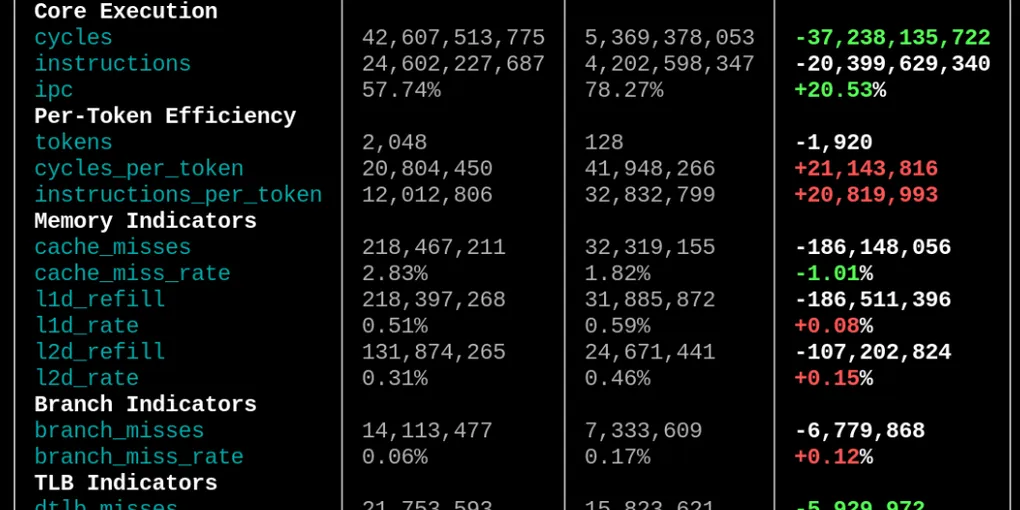
The original configuration uses a batch size of 4 and sequence length of 512. The modified example uses a batch size of 1 and sequence length of 128, reducing the number of tokens per batch from 2,048 to 128. That’s a 16-fold reduction in tokens, so the two configurations do not perform the same amount of work. For that reason, I treat this as an exploratory comparison rather than a like-for-like performance benchmark.
The modified implementation also explores execution-level changes, including deterministic inputs, tensor preallocation, a persistent ONNX Runtime session, cached input structures and reducing work in a frequently executed code path. These changes are intended to reduce repeated setup and allocation work and make execution more consistent.
The profiles show changes in instruction throughput, cache activity, TLB behaviour and branch misses. Those signals help identify areas to investigate, but they need to be interpreted alongside the different input shapes and amount of work. In particular, fixed runtime overhead can make per-token measurements look different when spread across a much smaller batch.
Making measurements useful
A profiler is only helpful when its results can be interpreted and revisited. A few design choices in InferPerf support that goal.
Warm-up and consistent inputs. Configurable warm-up passes reduce the influence of cold-start behaviour. Deterministic inputs also make repeated executions easier to compare.
Selective counter collection. The event set focuses on signals that can help investigate instruction throughput, memory behaviour, branches and TLB activity. The events available still depend on the target system.
A stored baseline. The baseline keeps PMU totals, workload metadata, the flamegraph path and the classifier’s interpretation together. It gives Validate a reference for subsequent runs and makes earlier results easier to revisit.
Rule-based recommendations. The classifier uses explicit rules to map patterns in the measurements to potential areas of concern. That makes the reasoning easier to inspect and refine, while keeping the recommendations as a starting point for investigation rather than a substitute for it.
Extending InferPerf
I wanted the workflow to be useful beyond the two included examples. The project includes MobileNetV2 and MiniLM-L12 model files and demonstration workloads, which provide a starting point for trying the same analysis process with different inference models.
To add a workload, place the model under models/, create its corresponding workload under workloads/, and run Analyse to generate a profile. The resulting baseline can then be validated or compared using the same workflow. Keeping workload definitions separate from the analysis pipeline helps avoid tying InferPerf to a single model architecture.
Limitations and next steps
InferPerf provides a lower-level view of AI inference, but that view has limits. PMU events vary across processors, aggregate counters can hide behaviour in individual code paths, and sampled profiles can be affected by measurement overhead. A classifier can point towards likely causes, but further experiments are needed to establish causality.
The Raspberry Pi 4B is also a constrained environment for exploring larger models and memory-intensive workloads. That makes it useful for edge-AI experiments, but findings should be tied to the workload and platform tested rather than assumed to apply to every Arm system.
Next, I want to test the workflow across additional Arm hardware and a broader range of inference workloads. That would help separate insights that generalise across platforms from those that depend on a specific microarchitecture, kernel or set of available events. I’d also like to get feedback from other developers on how useful the workflow is when investigating their own inference workloads.
Explore InferPerf
Want to take a closer look at how it works? Explore the source code, try the workflow on your own hardware, or adapt it to investigate a different AI workload.
Explore InferPerf on GitHub →