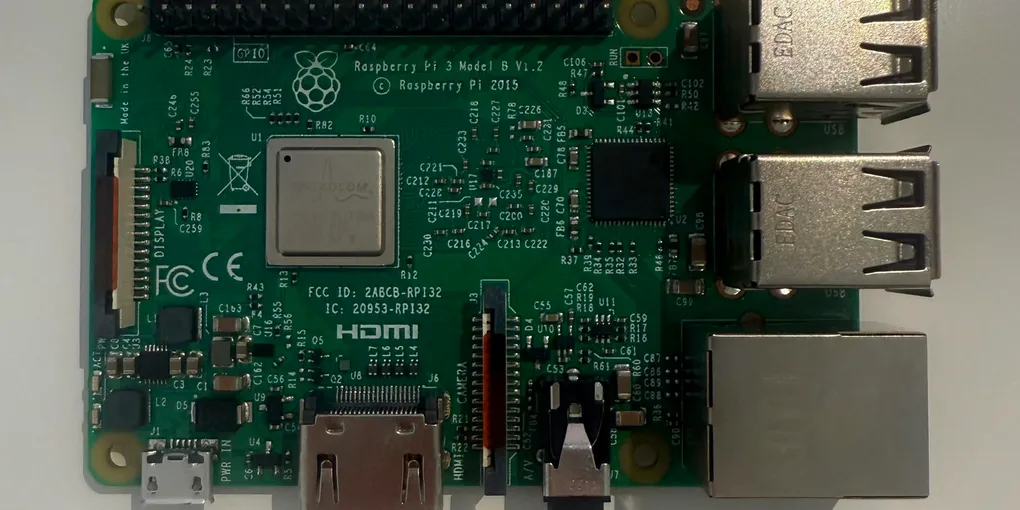
From Cortex-M to Cortex-A: A Robotics Engineer's Guide to Linux on Arm
Understand Arm microcontrollers, Linux-based computers and how they work together in robotics.
If you’ve programmed a microcontroller, there’s a good chance you’ve already used Arm technology without realising it. Many popular MCUs, including devices in the STM32 family, the Nordic nRF52840 and the RP2040, use Arm Cortex-M processor cores. Not every microcontroller uses Arm, though - the classic Arduino Uno, for example, uses an AVR microcontroller.
But microcontrollers are only one part of embedded computing. A robot may also need to process camera images, run AI models, plan routes and communicate over a network. These jobs can benefit from a more capable computer, often running a full operating system such as Linux.
This guide explores the difference between Cortex-M microcontrollers and Cortex-A application processors, explains what Linux is and shows how these technologies can work together in a robotics system.
Arm may already be familiar
A few terms help make sense of the different kinds of processors:
- Arm architecture defines the instruction set and rules that compatible processors and software use.
- Cortex is Arm’s family of processor designs. Cortex-M, Cortex-A and Cortex-R are designed with different types of computing task in mind.
- A microcontroller (MCU) typically combines a processor core with memory and peripherals such as timers, GPIO, ADCs and communication interfaces on one chip.
- An application processor is designed for more complex computing. It typically works with more memory and supports a full operating system.
The important distinction isn’t that one processor family is inherently better. Each is built around different requirements.
Cortex-M vs Cortex-A vs Cortex-R
| Family | Common role | Typical software | Main priority |
|---|---|---|---|
| Cortex-M | Microcontrollers, sensors and low-level control | Bare-metal firmware or an RTOS | Low power and responsive control |
| Cortex-A | Embedded computers and higher-level robotics | Linux or another full operating system | General-purpose computing and complex software |
| Cortex-R | Systems with demanding real-time needs | Dedicated real-time software or an RTOS | Predictable response for time-critical tasks |
These are common patterns, not strict boundaries. The right choice depends on the processor, software and requirements of the complete system. Arm’s processor overview explains the different families in more detail.
Cortex-M: close to the hardware
Cortex-M cores are commonly used in MCUs that read sensors, handle encoders, generate PWM signals and run motor-control loops. Firmware often interacts directly with peripherals and interrupts, with tight limits on memory and power. It may run without an operating system or use a real-time operating system (RTOS) to organise tasks.
Cortex-A: a computer inside your robot
Cortex-A cores are designed for more complex applications and commonly appear in single-board computers and embedded Linux systems. With more memory and a full operating system, they are well suited to tasks such as computer vision, AI inference, mapping, networking, data logging and higher-level planning.
Where does Cortex-R fit?
Cortex-R is designed for applications with demanding real-time requirements, including some safety- and control-focused systems. It’s useful to know about, even if your first robotics project mainly uses Cortex-M and Cortex-A.
What is Linux, and how is it different from Windows?
If Windows is what you normally use on your PC, Linux may feel unfamiliar at first. Think of it as a different operating-system ecosystem that’s widely used on servers, development boards, embedded devices and robotics computers.
Strictly speaking, Linux is the kernel: the core software that manages the processor, memory, devices and running programs. A Linux distribution, or distro, combines the kernel with system tools, libraries, package management and applications. Ubuntu and Raspberry Pi OS are two examples. A distribution can include a graphical desktop, but many Linux devices run without a monitor and are managed through a terminal or remotely over SSH.
Windows and Linux can both run command-line tools and graphical applications. The usual workflows differ, though:
| Area | Windows | Linux distributions |
|---|---|---|
| Typical setup | Often used as a desktop operating system | Can have a desktop, or run headlessly on boards and servers |
| Installing software | Often uses installers, Microsoft Store and Windows Update | Often uses a package manager alongside distribution updates |
| System tools | Windows-specific tools, services and conventions | Linux tools, services, permissions and filesystem conventions |
| Robotics use | Useful for coding and development; some tools run through WSL | Common on robot computers and in many ROS 2 deployment workflows |
Neither is universally better, and Windows remains useful for plenty of robotics development. Linux is especially relevant when the robot itself runs Linux, because being comfortable with that environment helps you develop, deploy and debug software on the target device. The Linux kernel overview explains the kernel’s role in more detail.
Linux also provides process and memory management, networking, device interfaces, logging and a broad ecosystem of programming languages and libraries. Frameworks such as ROS 2 build on that foundation to help organise robotics software into components that communicate with one another.
One important distinction: standard Linux does not guarantee that every task will run at an exact time. For hard real-time control, a system may need a real-time Linux configuration, a dedicated controller, or both.
How both can work together in a robot
A common design uses a Cortex-M microcontroller for low-level control and a Cortex-A computer for higher-level processing.
Cortex-M MCU: Read encoders, sample sensors, generate motor signals and handle local safety responses.
Cortex-A computer: Run ROS 2 applications, process camera images, run inference, plan movement and log data.
Communication link: Share sensor readings, status, targets and commands over interfaces such as UART, CAN, USB or Ethernet.
For example, a Linux computer might calculate a target wheel speed and send it to a microcontroller. The microcontroller can run the motor-control loop locally and report encoder readings back. If the higher-level application pauses, the controller can follow its own timeout or safe-state behaviour.
This division is a design choice, not a rule for every robot. Some systems can do everything on one computer, while others use several controllers. ROS 2 concepts can also be brought to supported microcontroller environments through micro-ROS.
Getting comfortable with Linux
You don’t need to become a Linux administrator to get started. A few commands will help you understand the computer your application is running on:
# Show the system architecture
uname -m

# Display CPU information
lscpu

# Check memory use
free -h

# View running processes and system activity
top
As you get more comfortable, learn to install packages, inspect logs, manage services and connect to a board over SSH. These skills make it easier to debug a robot without connecting a screen and keyboard directly to it.
Where to go next
If you’re moving from microcontrollers to Linux-based robotics, build your skills in stages:
- Get a Linux board running and learn to use its terminal.
- Run a small application and inspect CPU and memory use.
- Record a baseline using consistent inputs.
- Use a profiling tool to investigate one specific question.
- Make one change, rerun the test and compare the results.
Cortex-M and Cortex-A solve different computing problems, and many robots can benefit from both. A microcontroller can handle focused, timing-sensitive work, while an Arm application processor provides the operating system and resources for more complex applications. Knowing how they fit together helps you make better design choices and investigate problems with more confidence.
For further reading, these resources are useful starting points:
- Arm CPU architecture overview: Explore Arm’s processor architecture profiles.
- ROS 2 documentation: Learn about ROS 2 concepts and tools.
- micro-ROS: Explore ROS 2 for supported microcontroller platforms.
- Linux perf wiki: Find documentation for Linux performance analysis.
To see these ideas applied in practice, explore InferPerf, a project I built to investigate AI inference performance on a Raspberry Pi 4B using Linux perf, hardware performance counters and flamegraphs. If you’re looking for an affordable way to get started with Linux yourself, take a look at my portable setup guide.